FanControl

FanControl
🌬️ A macOS menu bar fan controller.
A macOS menu bar app that reads and controls fan speeds via the System Management Controller (SMC).
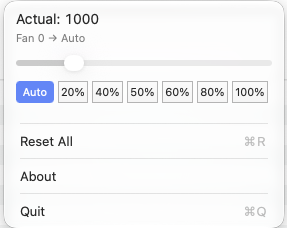
How it works
FanControl talks to the SMC through IOKit to read current fan speeds and minimum/maximum RPM for each fan. You can override the automatic fan curve by setting a fixed speed as a percentage, or reset to let the system take back control. All controls live right in the menu bar dropdown — no window to hunt for.
Features
- Fan speeds at a glance — see current RPM for every fan in the menu bar
- Slider control — set fan speed as a percentage per fan via an inline slider
- Reset All — return all fans to automatic control with one click
Requirements
- macOS 14.0+
- SMC-compatible Mac (Intel and Apple Silicon)
Why is this needed?
macOS manages fans automatically, but sometimes you want more control — for quieter operation under light load, or maximum cooling when pushing the hardware. FanControl gives you that control with minimal friction.
How to install & run
FanControl is not signed with an Apple Developer ID, because developing free and open-source software doesn’t pay for a $99/year Apple Developer Program membership. As a result, macOS may block the app from opening.
- Download the zip file from the releases page.
- Double-click the app in Finder, then confirm when prompted. ⚠️ Click Done
- Open System Settings → Privacy & Security, scroll down, and click the Open Anyway button.
- Confirm with your Touch ID or Lock Screen password.
Building
xcodebuild -project FanControl.xcodeproj -scheme FanControl build
License
FanControl is open source on GitHub under the GNU General Public License v3.0.