ShortcutPeek

ShortcutPeek
⌨️ A shortcut cheat sheet.
A macOS menu bar app that shows keyboard shortcuts for the current application — just hold ⌘.
How it works
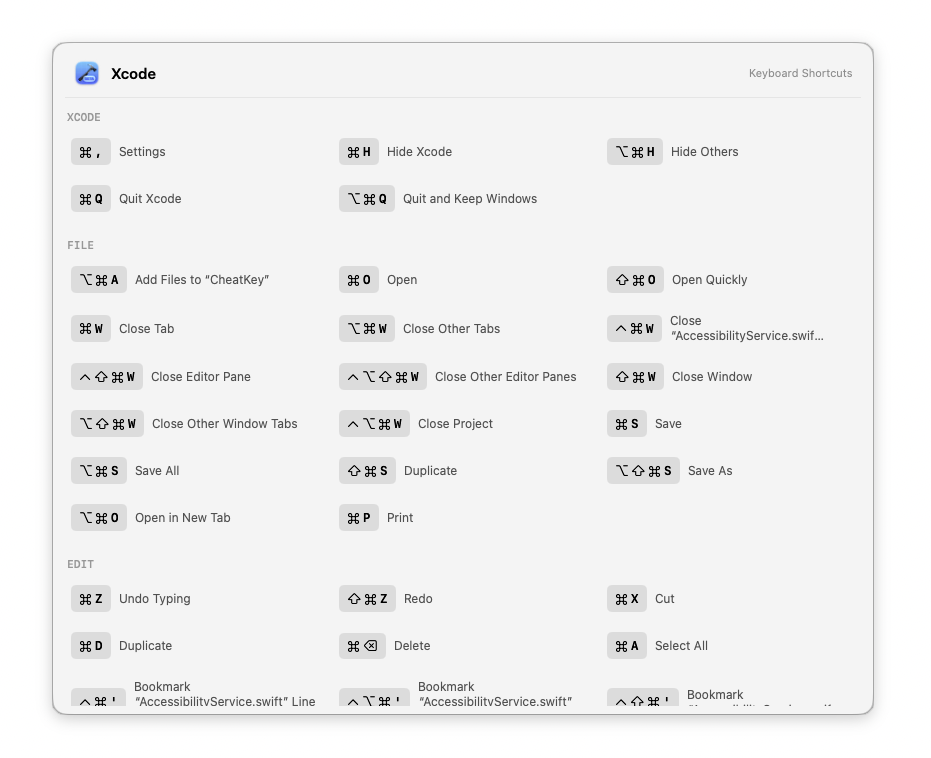
Hold the Command key for a moment, and ShortcutPeek reads the frontmost app’s menu bar via Accessibility API, then displays a floating card with all available shortcuts grouped by menu category (File, Edit, View, etc.). Tap any shortcut to execute it.
Features
- Hold ⌘ — overlay appears after a configurable hold duration (Fast / Default / Slow)
- Show Shortcuts… — also available from the menu bar icon, with a close button
- App switching — overlay refreshes automatically when switching apps while holding ⌘
- Launch at login — optional, in settings
- No AltTab interaction — the overlay is a non-activating panel; clicking tiles sends keystrokes to the original app
Requirements
- macOS 15.6+
- Accessibility permission (required for reading other apps’ menu bars)
How to install & run
ShortcutPeek is not signed with an Apple Developer ID, because developing free and open-source software doesn’t pay for a $99/year Apple Developer Program membership. As a result, macOS may block the app from opening.
- Download the zip file from the releases page.
- Double-click the app in Finder, then confirm when prompted. ⚠️ Click Done
- Open System Settings → Privacy & Security, scroll down, and click the Open Anyway button.
- Confirm with your Touch ID or Lock Screen password.
Building
xcodebuild -project ShortcutPeek.xcodeproj -scheme ShortcutPeek -configuration Release build
License
ShortcutPeek is open source on GitHub under the GNU General Public License v3.0.